PokiPod
UX DESIGN
VISUAL DESIGN
WEB DESIGN

Overview
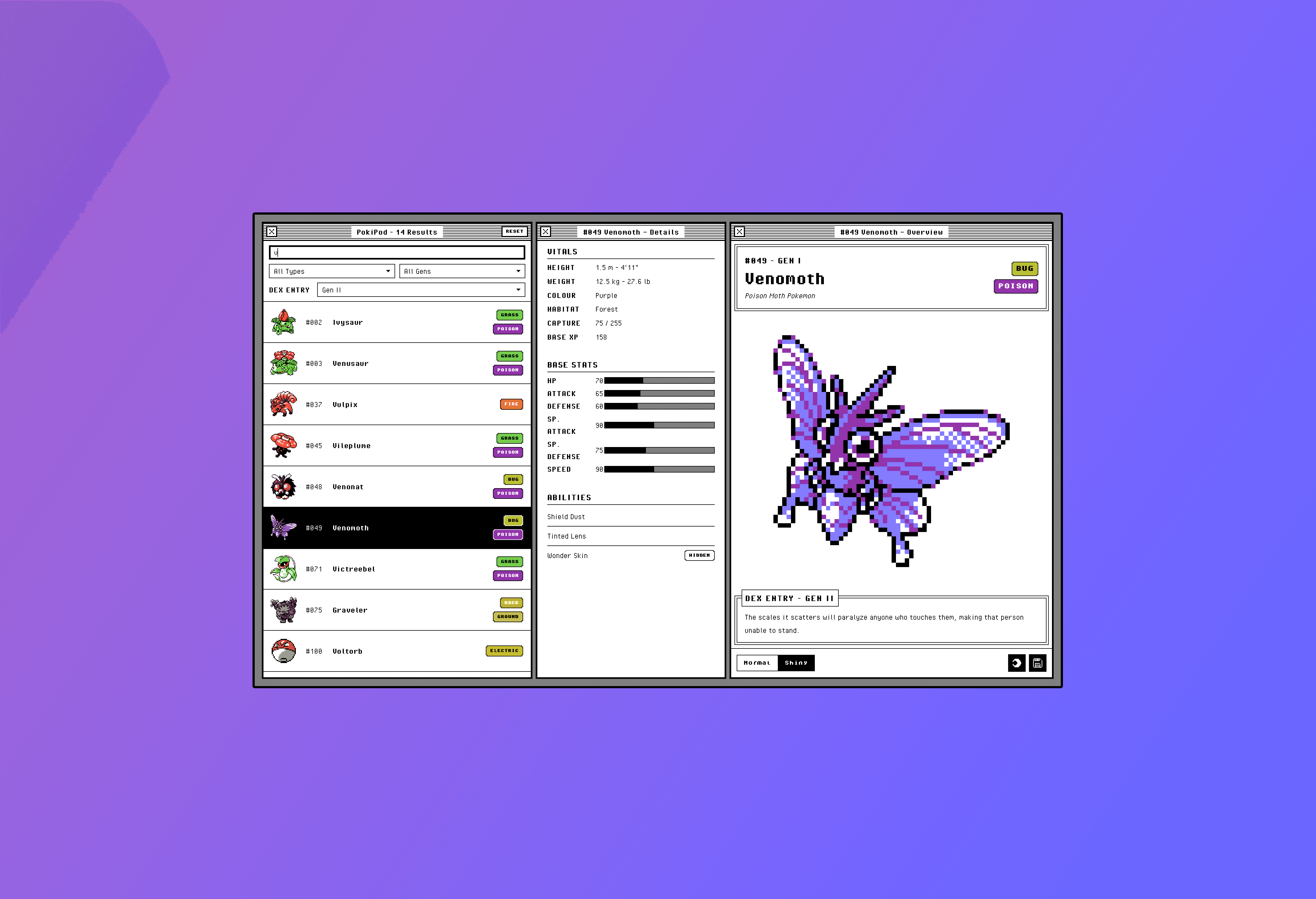
PokiPod is a Pokémon database search experience designed to feel nostalgic while serving up a substantial amount of structured information. It supports search across generations one through nine, and lets users filter by generation to surface different sprites and Pokédex entries for the same Pokémon.
The original brief, part of my ongoing growth and education, was to design the core UI for a dense, content-driven database with a focus on content grouping, layout, and visual hierarchy. The exercise didn't require this to be a real app, but I saw it as a chance to build something with real data, real interactions, and a design language that could carry the weight of it all.

Challenge
Dense, content-driven interfaces are a particular kind of design challenge. There's no easy way to hide complexity. The information has to be there, the user expects it, and any attempt to over-simplify ends up frustrating the people who came specifically for the depth. A Pokémon database has to surface stats, types, abilities, sprite variants, dex entries, generation context, and more.
The risk is twofold. Either everything competes for attention and the layout collapses into noise, or the design over-corrects and buries information behind too many clicks. Neither serves the user. The goal was to find a layout and visual hierarchy that respected the density of the content while keeping it scannable, navigable, and visually pleasant.
There was a secondary problem, too. The sprites themselves are tiny pixel art, designed for handheld screens decades ago. Displaying them at modern sizes, with crisp edges and clean backgrounds, required some technical creativity.

Research
While I was less concerned about UX research for the scope of this particular project, it definitely still involved technical research. Two questions needed answers before I could move forward on the build side. Where the data was going to come from, and how I was going to handle the sprite art at modern display sizes.
For the data, I evaluated a few options and settled on the PokeAPI. It's well-documented, comprehensive across generations one through eight, and structured in a way that mapped cleanly onto the panel-based UI I was planning. Knowing the shape of the data early let me design with real content in mind rather than placeholder stand-ins.
For the sprite rendering, I needed to understand what was actually feasible. The original sprite art is small pixel art, and standard image scaling produces soft, blurry results that would have undermined the entire visual direction. I researched canvas-based nearest-neighbor approaches that preserve pixel edges, and looked into edge-aware techniques for stripping the original background out of the sprite art so it could sit cleanly on a dark surface. Both turned out to be feasible inside the project, which is what gave me the confidence to design around large, clean sprites in the first place.

Process
The design work happened in Figma. I built out the layout, hierarchy, panel system, and full visual language there, treating the project the same way I'd treat any client work. The design decisions were all mine, and I got the entire visual system to a place where the implementation would have something specific to follow rather than something to interpret.
From there, I worked with Claude Code on the build. Going in, I had a clear architectural plan: where the data was coming from, how the sprite handling needed to work, how the panel system should behave. The clarity of the design definition mattered. With a precise spec in hand, the build phase was about executing on a plan, which kept the creative direction firmly with the design.

Solution
The delivered version of PokiPod is a working Pokémon database that pulls live data from the PokeAPI and presents it through a layout designed to handle dense content without becoming overwhelming.
A flexible panel layout: Users can show, hide, and rearrange panels to suit how they want to explore the data, accommodating different reading patterns without fragmenting the experience.
Generation-aware filtering: Search results respect the selected generation, so users can browse Pokémon and view the sprites and dex entries from the era they want, even when the Pokémon predates that generation.
A canvas-based nearest-neighbor sprite upscaler: Sprite art is enlarged with crisp pixel edges intact, no soft scaling artifacts.
Edge-aware background erasure: Original sprite backgrounds are removed so the art reads cleanly against any surface color, supporting a polished dark mode.
A progressive pixelation render effect: Sprites animate in with a brief pixelation effect, adding a small piece of visual personality that suits the subject matter.
Sprite export: Users can save the upscaled, background-cleared sprite as a PNG to their device, turning the database into a small utility as well as a reference.

Outcome
PokiPod was a personal exercise more than a shipped product, so the most meaningful results live in the design and engineering decisions rather than in user metrics. Even so, there are a few things worth naming.
The layout holds up under genuinely dense content. The hierarchy makes it possible to take in a Pokémon's full profile at a glance, and the panel system gives more advanced users room to customize without complicating the default view for everyone else. The technical work around the sprites means the art looks the way it should at the size it needs to be, in both light and dark modes. None of those details are loud, but together they're what separates a database that feels considered from one that feels like a data dump.
This was also my first real attempt at using AI as part of an engineering workflow on a project I cared about. I have plenty of reservations about AI in the creative realm, and that hasn't changed. What this project clarified for me is that with a precise design definition and a clear architectural plan in hand, AI can be a useful collaborator on execution. The creative work was all mine. Claude Code helped me get a working version of it into the world faster than I could have on my own.
For what it's worth, the launched demo was extremely popular when I shared it on social media! Check it out for yourself: